Exportação
A exportação gera uma planilha (XLS ou CSV) com os lançamentos, para usar fora do Meu Dinheiro — em Excel, Google Sheets ou no envio ao contador. Ela pode ser feita a partir do extrato, do resultado da busca ou dos relatórios.
Formas de exportar
| Forma | Como |
|---|---|
| Exportação seletiva | Em qualquer tela, relatório ou resultado de busca, marque os lançamentos desejados (caixas de seleção à esquerda) e clique no ícone Exportar (⬇) na barra de ações em lote. |
| Exportação em massa | Nos relatórios analíticos, é possível exportar todos os registros de uma vez, sem precisar marcar um a um. |
Nos dois casos abre-se a mesma janela de configuração antes de gerar o arquivo.
Configuração da exportação
Na janela Exportar você define o nome do arquivo, o formato e quais informações entram na planilha.

| Opção | O que faz |
|---|---|
| Arquivo de saída | Nome do arquivo gerado. O sistema sugere um nome automático (com data e hora), que pode ser alterado. |
| Formato | Exportar como XLS (planilha do Excel) ou Exportar como CSV (texto separado por vírgulas). |
| Marcar todas as colunas | Inclui ou remove de uma vez todas as colunas da planilha. |
Colunas
Em Incluir as seguintes colunas, marque quais campos aparecem na planilha. As colunas disponíveis são: Tipo, Status, Data, Venc. Fatura, Valor, Descrição, Categoria, Conta, Conta transferência, Centro, Contato, Forma, Projeto, N. Documento, Observações, Data competência, ID Único, Tags, Cartão, Repetição, Meta de Economia e Data de criação.
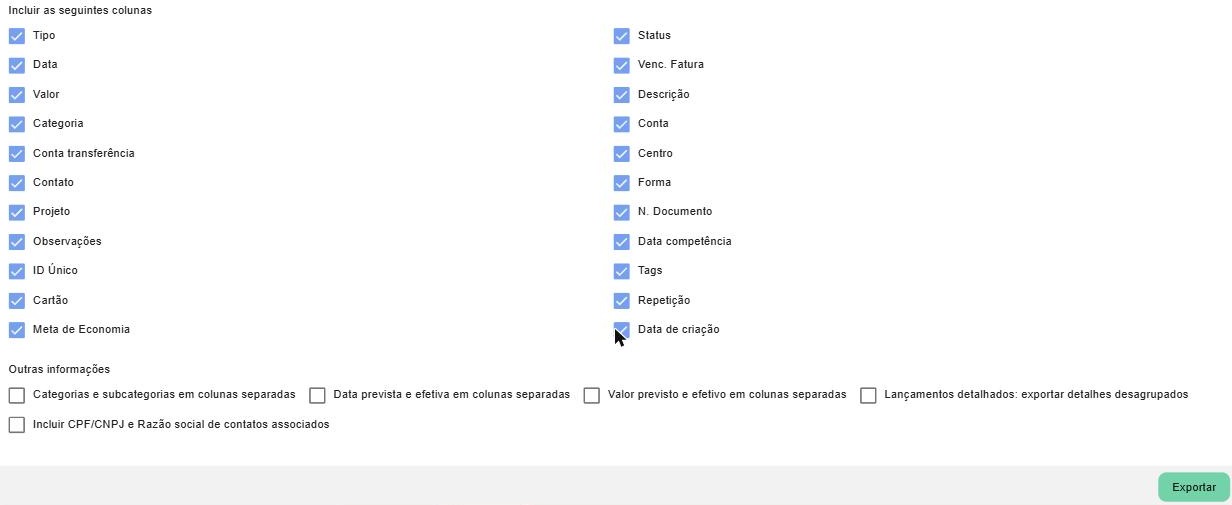
Outras informações
Opções adicionais que mudam a forma como os dados saem na planilha:
| Opção | O que faz |
|---|---|
| Categorias e subcategorias em colunas separadas | Separa a categoria e a subcategoria em duas colunas distintas. |
| Data prevista e efetiva em colunas separadas | Exporta a data prevista e a data efetiva em colunas diferentes. |
| Valor previsto e efetivo em colunas separadas | Exporta o valor previsto e o valor efetivo em colunas diferentes. |
| Lançamentos detalhados: exportar detalhes desagrupados | Exporta os itens de um lançamento detalhado de forma desagrupada (uma linha por item). |
| Incluir CPF/CNPJ e Razão social de contatos associados | Acrescenta as colunas de CPF/CNPJ e razão social dos contatos vinculados. |
Ao terminar, clique em Exportar para gerar e baixar o arquivo.
Como a exportação parte de uma seleção de lançamentos, você pode combiná-la com a busca ou com a seleção por status no extrato para exportar exatamente o conjunto que precisa.
Páginas relacionadas
- Buscar lançamentos — como levantar exatamente o conjunto de lançamentos a exportar.
- Ações em lote — como marcar os lançamentos e as demais ações da barra.
- Relatórios — os relatórios analíticos, de onde sai a exportação em massa.