Gerenciar lançamentos
Depois de criado, um lançamento pode passar por várias operações — reconhecer, confirmar, conciliar, editar, excluir, clonar, emitir recibo, estornar, detalhar e desagrupar. Todas ficam no menu de ações (ícone de três pontos ⋮), no lado direito da linha do lançamento.
As opções disponíveis variam conforme o tipo e o status do lançamento — por isso o menu nem sempre mostra todas as ações.
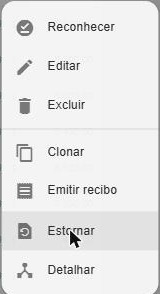
| Ação | O que faz | Quando aparece |
|---|---|---|
| Reconhecer | Marca uma ocorrência de um lançamento de repetição fixa, indicando que o valor e a data efetivos já estão corretos. | Receitas e despesas de repetição fixa ainda não confirmadas (nem conciliadas). |
| Confirmar | Muda o status de pendente/agendado para confirmado. | Lançamentos pendentes ou agendados. |
| Conciliar | Muda o status para conciliado. | Pendentes, agendados ou confirmados. |
| Editar | Altera as informações do lançamento. | Sempre. |
| Excluir | Remove o lançamento definitivamente. | Sempre. |
| Clonar | Cria um novo lançamento a partir de um já existente. | Sempre. |
| Emitir recibo | Gera um recibo de pagamento/recebimento para o cliente ou fornecedor. | Receitas e despesas. |
| Estornar | Cria um lançamento com a mesma categoria e valor invertido, anulando o efeito financeiro. | Lançamentos confirmados ou conciliados. |
| Detalhar | Transforma um lançamento normal em um lançamento detalhado. | Despesa, receita ou transferência normais. |
| Desagrupar | Separa os itens de um lançamento detalhado em lançamentos normais. | Lançamentos detalhados. |
Cada ação tem sua própria página com os detalhes. Muitas também podem ser feitas em massa — veja Ações em lote.